ParrotSec NO PUBLIC KEY Error
本有了wsl2,指望彻底把vmware扔到垃圾桶里,结果今天发现wsl2居然不支持usb设备。。。
只好又赶紧翻出来vmware装上linux。
结果apt install的时候又提示NO PUBLIC KEY。。。
确定要添加的PUBLIC KEY的摘要
为啥只有一张图呢?
因为懒,所以我就只传一张图了,包含所有步骤了(狗头
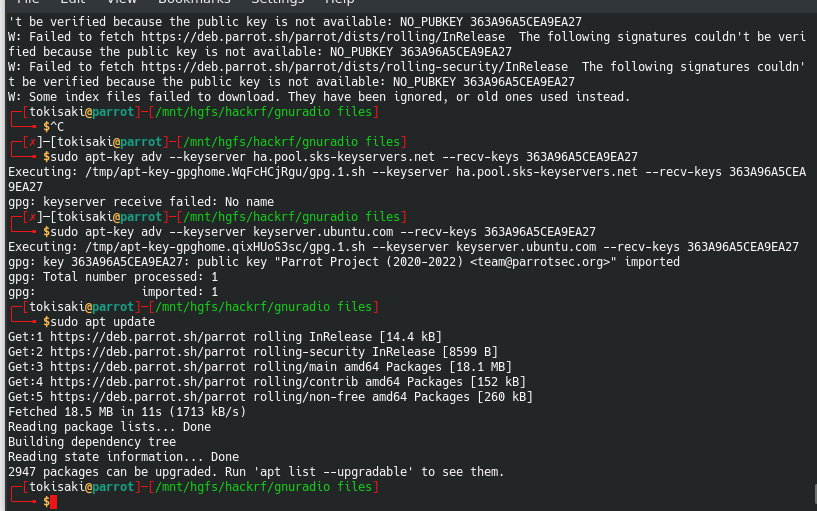
apt update之后,会提示the public key is not available: NO_PUBKEY XXXXXXXXX
记下来这个XXXXXXX
添加PUBLIC KEY
sudo apt-key adv --keyserver keyserver.ubuntu.com --recv-keys XXXXXXX
emmm其实一开始我碰到这个奇葩的问题是一脸懵逼的,去百度查一下,说用ha.pool.sks-keyserver.net这个地址,结果发现访问不了。(百度垃圾)
最后实在没办法了(找不到了),死马当活马医,给parrotsec用ubuntu的keyserver,发现居然可以,大喜。
可能是因为他们俩都是同父异母的兄弟吧(debian)。
Finally had WSL2, hoping to throw VMware into the trash for good, only to discover today that WSL2 doesn’t support USB devices…
Had to quickly dig out VMware and install Linux again.
Then, when running apt install, it prompted NO PUBLIC KEY…
Determine the digest of the PUBLIC KEY to add
Why only one image?
Because I’m lazy, so I just uploaded one image containing all the steps (dog head emoji).
After apt update, it will prompt the public key is not available: NO_PUBKEY XXXXXXXX
Write down this XXXXXXXX.
Add the PUBLIC KEY
sudo apt-key adv --keyserver keyserver.ubuntu.com --recv-keys XXXXXXXX
Hmm, actually, when I first encountered this bizarre issue, I was completely clueless. I searched on Baidu, which suggested using the ha.pool.sks-keyserver.net address, but found it was unreachable. (Baidu is trash.)
In the end, I was out of options (couldn’t find a solution), so as a last resort, I tried using Ubuntu’s keyserver for ParrotSec, and surprisingly, it worked. I was overjoyed.
Probably because they are like half-brothers (from Debian).