Managing Tailscale Elegantly on OpenWrt: luci-app-tailscale-community
2026/1/23
经过两三个月的代码审查PR#8018,luci-app-tailscale-community 已正式合并到 OpenWrt 主线 LuCI 仓库中,未来的发行版可以直接通过官方源安装该插件,无需额外操作。
另外,这是我第一次将个人项目成功合并到 OpenWrt 主线,感到非常荣幸!
项目地址
https://github.com/tokisaki-galaxy/luci-app-tailscale-community
简介
Tailscale 作为一种基于 WireGuard 的零配置 VPN,极大地简化了设备之间的安全连接。对于在 OpenWrt 路由器上运行 Tailscale 的用户来说,通过命令行进行管理虽然可行,但远不如图形化界面来得直观和高效。为了解决这一问题,我开发了 luci-app-tailscale-community,一个专为 OpenWrt LuCI 界面设计的 Tailscale 管理插件。
luci-app-tailscale-community 旨在提供一个原生集成、功能全面的 Web 界面,让用户可以轻松地监控 Tailscale 网络状态并调整各项配置,而无需登录 SSH。
核心功能概览
该插件将 Tailscale 的核心功能无缝集成到 LuCI 的“服务”菜单下,主要分为“状态”和“设置”两个部分。
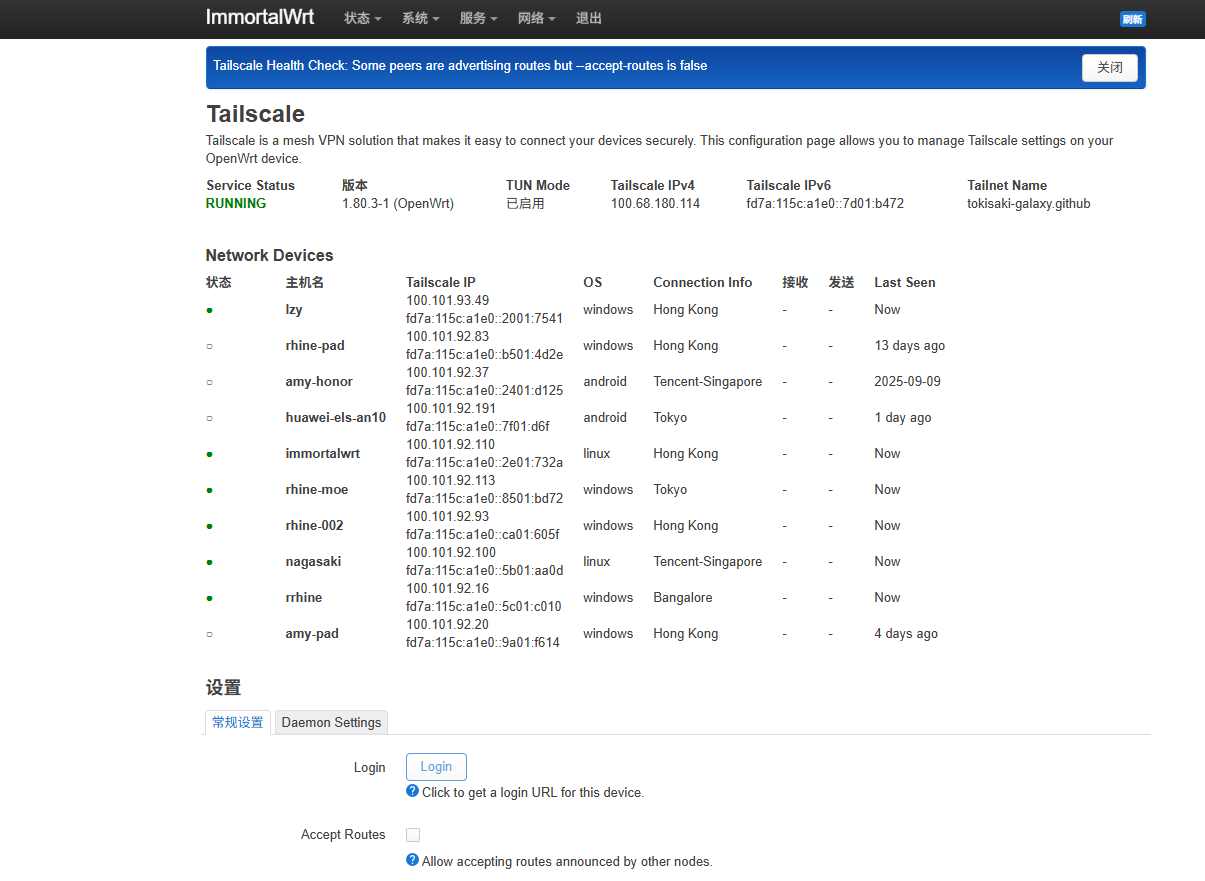
1. 状态仪表盘
提供对 Tailscale 网络健康状况的即时洞察:
- 服务状态: 清晰地显示
tailscaled守护进程是“运行中”还是“未运行”。 - 设备 IP: 展示当前设备的 Tailscale IPv4 和 IPv6 地址。
- 网络设备列表: 以表格形式详尽列出 Tailnet 中的所有对等节点(Peers),包含以下关键信息:
- 在线状态: 通过颜色标识节点是在线还是离线。
- 主机名与 DNS: 显示设备的主机名和完整的 Tailscale DNS 名称。
- 连接类型: 指明连接是“直连 (Direct)”还是通过“中继 (Relay)”,并显示中继服务器信息。
- 操作系统 和 Tailscale IP。
- 最后在线时间: 对于离线设备,显示其最后一次活跃的时间。
2. 强大的设置管理
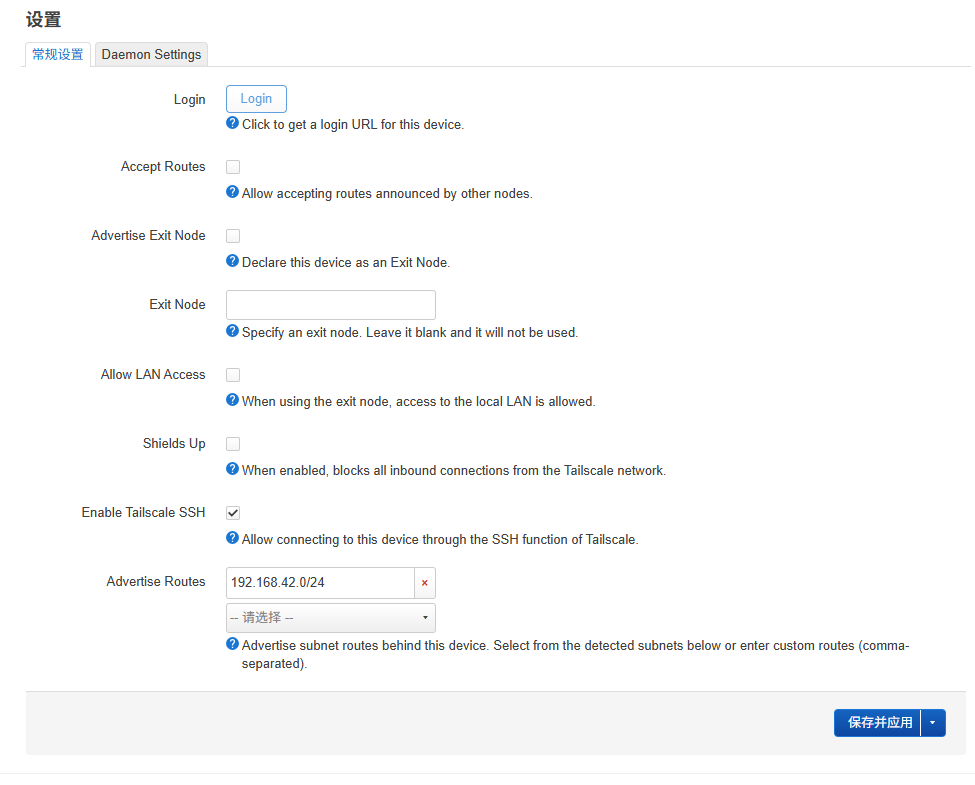
设置页面通过两个标签页,区分了即时生效的节点设置和需要重启服务的守护进程设置。
节点设置 (Node Settings)
这些设置通过调用tailscale set命令实现,更改会立即生效,无需中断服务。支持的配置项包括:- 接受/通告路由 (
Accept Routes/Advertise Routes) - 作为或使用出口节点 (
Advertise as Exit Node/Use Exit Node) - 为子网路由启用 SNAT
- 启用内置 SSH 服务器
- 切换
Shields Up模式以增强安全性 - 设置自定义主机名
- 接受/通告路由 (
守护进程环境设置 (Daemon Environment Settings)
这些高级选项通过修改tailscaled启动时的环境变量来实现,因此在保存后需要重启服务。- 自定义 MTU: 解决特定网络环境下的连接问题。
- 减少内存使用: 针对内存有限的设备进行优化,通过设置
GOGC=10环境变量,以少量 CPU 开销换取更低的内存占用。
技术实现
luci-app-tailscale-community 主要使用 Lua 编写,并遵循 LuCI 的 MVC 架构。
- 数据模型:
luasrc/model/tailscale_data.lua是核心数据加载器。它通过执行tailscale status --json和tailscale ip命令获取实时状态,并解析/etc/tailscale/tailscaled.state文件以获取更详细的运行时配置。 - CBI 界面:
luasrc/model/cbi/tailscale_status.lua和tailscale_settings.lua文件使用 LuCI 的 CBI (Configuration Binding Interface) 框架来构建用户界面,并将前端选项与后端配置和命令关联起来。 - 配置应用: 对于守护进程设置,插件会动态创建或更新位于
/etc/profile.d/的一个 shell 脚本,确保在tailscaled服务启动时能加载正确的环境变量。
安装与使用
安装过程非常简单:
- 前提条件: 确保您的 OpenWrt 设备已安装
tailscale和coreutils-base64。1
2opkg update
opkg install tailscale coreutils-base64 - 安装插件: 从项目的 GitHub Release 页面下载最新的
.ipk软件包,上传到路由器并使用opkg安装。也可以从项目的action下载1
opkg install luci-app-tailscale-community_*.ipk
安装完成后,刷新 LuCI 页面,即可在“服务”菜单下找到“Tailscale”入口。
2026/1/23 Update
Following a two-to-three-month code review process in PR#8018, luci-app-tailscale-community has been officially merged into the OpenWrt upstream LuCI repository. Future releases will allow users to install this plugin directly from the official software feeds without any additional steps.
On a personal note, this is my first time successfully merging a personal project into the OpenWrt mainline, and I feel deeply honored!
Project Repository
https://github.com/tokisaki-galaxy/luci-app-tailscale-community
Introduction
Tailscale, a zero-config VPN based on WireGuard, greatly simplifies secure connectivity between devices. While managing Tailscale via the command line on an OpenWrt router is functional, it is far less intuitive and efficient than a graphical interface. To address this, I developed luci-app-tailscale-community, a management plugin specifically designed for the OpenWrt LuCI interface.
luci-app-tailscale-community aims to provide a natively integrated, full-featured web interface that allows users to easily monitor their Tailscale network status and adjust configurations without ever needing to log in via SSH.
Core Features at a Glance
The plugin seamlessly integrates Tailscale’s core functionality into the LuCI “Services” menu, divided into two main sections: “Status” and “Settings.”
1. Status Dashboard
Provides instant insights into the health of your Tailscale network:
- Service Status: Clearly indicates whether the
tailscaleddaemon is “Running” or “Not Running.” - Device IP: Displays the current device’s Tailscale IPv4 and IPv6 addresses.
- Network Device List: A detailed table listing all peers in the Tailnet, including:
- Online Status: Color-coded indicators for online/offline nodes.
- Hostname & DNS: Displays the device hostname and full Tailscale DNS name.
- Connection Type: Specifies whether the connection is “Direct” or via “Relay,” including relay server info.
- OS & Tailscale IP: Operating system and assigned internal IP.
- Last Seen: For offline devices, shows the last time they were active.
2. Powerful Settings Management
The settings page uses two tabs to distinguish between immediate node settings and daemon settings that require a service restart.
Node Settings
These settings are implemented by calling thetailscale setcommand. Changes take effect immediately without service interruption. Supported options include:- Accept/Advertise Routes
- Advertise as Exit Node / Use Exit Node
- Enable SNAT for subnet routing
- Enable built-in SSH server
- Toggle
Shields Upmode for enhanced security - Set a custom hostname
Daemon Environment Settings
These advanced options are implemented by modifying the environment variables used whentailscaledstarts, thus requiring a service restart after saving.- Custom MTU: Resolve connectivity issues in specific network environments.
- Reduce Memory Usage: Optimized for memory-constrained devices. By setting the
GOGC=10environment variable, it trades a small amount of CPU overhead for a significantly lower memory footprint.
Technical Implementation
luci-app-tailscale-community is primarily written in Lua and follows the LuCI MVC (Model-View-Controller) architecture.
- Data Model:
luasrc/model/tailscale_data.luaacts as the core data loader. It fetches real-time status by executingtailscale status --jsonandtailscale ip, and parses/etc/tailscale/tailscaled.statefor detailed runtime configurations. - CBI Interface: The
luasrc/model/cbi/tailscale_status.luaandtailscale_settings.luafiles utilize LuCI’s CBI (Configuration Binding Interface) framework to build the UI, linking frontend options to backend configurations and commands. - Config Application: For daemon settings, the plugin dynamically creates or updates a shell script located in
/etc/profile.d/to ensure the correct environment variables are loaded when thetailscaledservice starts.
Installation and Usage
The installation process is straightforward:
- Prerequisites: Ensure your OpenWrt device has
tailscaleandcoreutils-base64installed.opkg update opkg install tailscale coreutils-base64 - Install the Plugin: Download the latest
.ipkpackage from the GitHub Release page, upload it to your router, and install it usingopkg.opkg install luci-app-tailscale-community_*.ipk
(Alternatively, you can download build artifacts from the project’s GitHub Actions.)
Once installed, refresh the LuCI page to find the “Tailscale” entry under the “Services” menu.