Building a Blog
第一部分
HEXO简介
Hexo 是一个快速、简洁且高效的博客框架。Hexo 使用 Markdown(或其他渲染引擎)解析文章,在几秒内,即可利用靓丽的主题生成静态网页。
原来我是用jekyll的,但是无奈支持的东西比较少,生成速度慢,所以改HEXO。
1. 安装HEXO
HEXO中文文档上都有
2.新建存储库
如果你是把整个HEXO文件夹上传!!一定要设成私有!!
如果你用deploy部署,那随便你设不设私有
去Github上新建一个存储库,名字随便,记得设置私有。保证只有你和vercel上的机器人看得到。
至于为什么把整个HEXO上传,原因是如果你换一台电脑不是还可以接写博客吗。
3.初始化HEXO
1 | |
关联Github
1 | |
3.下载主题,设置submodule
直接把模板clone下来之后后继更新非常麻烦,所以使用submodule。
推荐模板hexo-theme-matery(当然你用别的也行)。
先在网页上fork到自己的存储库里,然后在根目录中执行git submodule add https://github.com/blinkfox/hexo-theme-matery/ themes\hexo-theme-matery,作为子模块clone到themes目录中的hexo-theme-matery。
接着试着用github desktop或者git进行push,如果没问题就往下看。
当然有些教程会说设置deploy,直接上传源目录和上传public目录效果完全一致,区别只是在vercel上的部署有一点点不同。但是我更喜欢这种方法。(毕竟可以直接在github上写博客嘛)
4.本地预览
随便打开个什么cmd或者powershell,进入上一步的那个文件夹,输入hexo s之后,等一会,直到你看到出现了Hexo is running at http://localhost:4000之后在浏览器里打开这个网址。
看完了按Ctrl+C就可以关掉本地预览。
啊对了,第一次操作会让你安装依赖包,跟着他提示操作就行了。
5.使用zeit托管
为什么使用zeit托管
百度收录
免费
Vercel is the easiest way to deploy websites. Host your web projects with zero configuration, automatic SSL, and global CDN.
同类产品有netlify,其实这个也不错,我不用他是因为我不挂梯子打不开他的页面。
其实我原来用Github Pages,但是那玩意域名我觉得不好看(xxx.github.io),并且不能被百度爬,所以最后放弃了。
当然你也可以用coding对国内进行分流,来实现让百度爬你的目的,但是太麻烦了。并且coding的服务不太稳定。(2021coding更新了,我没试过,不好评论)
另一个是gitee,那个各方面都挺不错的,除了不支持自定义域名。。
1.注册zeit
2.导入
主页点击 “Import Project”,然后 “Import Project From Git Repo”,选择 GitHub。进行一下授权,然后选择你在一开始新建的存储库导入。
注意如果你用我的方法,将整个hexo文件夹同步到云端,你会看到你的类型是HEXO,如果你用的是deploy,这里显示是other。
最后你就可以访问一个类似于xxxx.now.sh的网址来访问你的博客了(是不是比github那个xxx.github.io好看多了?)。
并且如果你是将整个HEXO文件夹同步到github,你会发现
3.搞一个域名
可能有人会问,zeit给的now.sh不好吗,搞什么自己域名?当然可以啦,只不过访问速度慢死而已,有了自己的域名就可以用cloudflare加速!
域名随便你去哪弄,可以去买腾讯云的域名,首年才1块钱得一个xyz,而且附带可以用域名邮箱。
当然你想白嫖可以,去freenom注册个免费域名,然后把NS服务商改成cloudflare的就行了。
(但是freenom上的域名好像不能注册腾讯的企业邮箱)
4.注册cloudflare
刚刚说过了,now.sh在国内访问速度不(惨)太(不)好(忍)看(睹),用cloudflare可以大大提升访问速度。
去cloudflare注册一个账户,然后按照提示一步一步操作,将NS记录(域名服务器记录)改成cloudflare为你提供的。
之后你所有DNS更改都需要在cloudflare上操作,否则无效
5.增加指向vercel的记录
去vercel,在项目里找到”view domains”,将你想用的域名输进去(就是前缀+””.”+之前搞到的域名)
然后按照他的提示去cloudflare增加一条CNAME。
当然我其实想设置CNAME记录的,但是如果设置CNAME的话,总是出现一些奇奇怪怪的问题,所以只好设置成A记录。

无论如何,请一定确认时候一定要确认代理状态为黄色(已代理)
无论如何,请一定确认时候一定要确认代理状态为黄色(已代理)
无论如何,请一定确认时候一定要确认代理状态为黄色(已代理)
6.添加404页面
在根目录下面新建now.json,里面如下。
1 | |
可能会有的一些坑
1.访问博客出现525错误,如下图
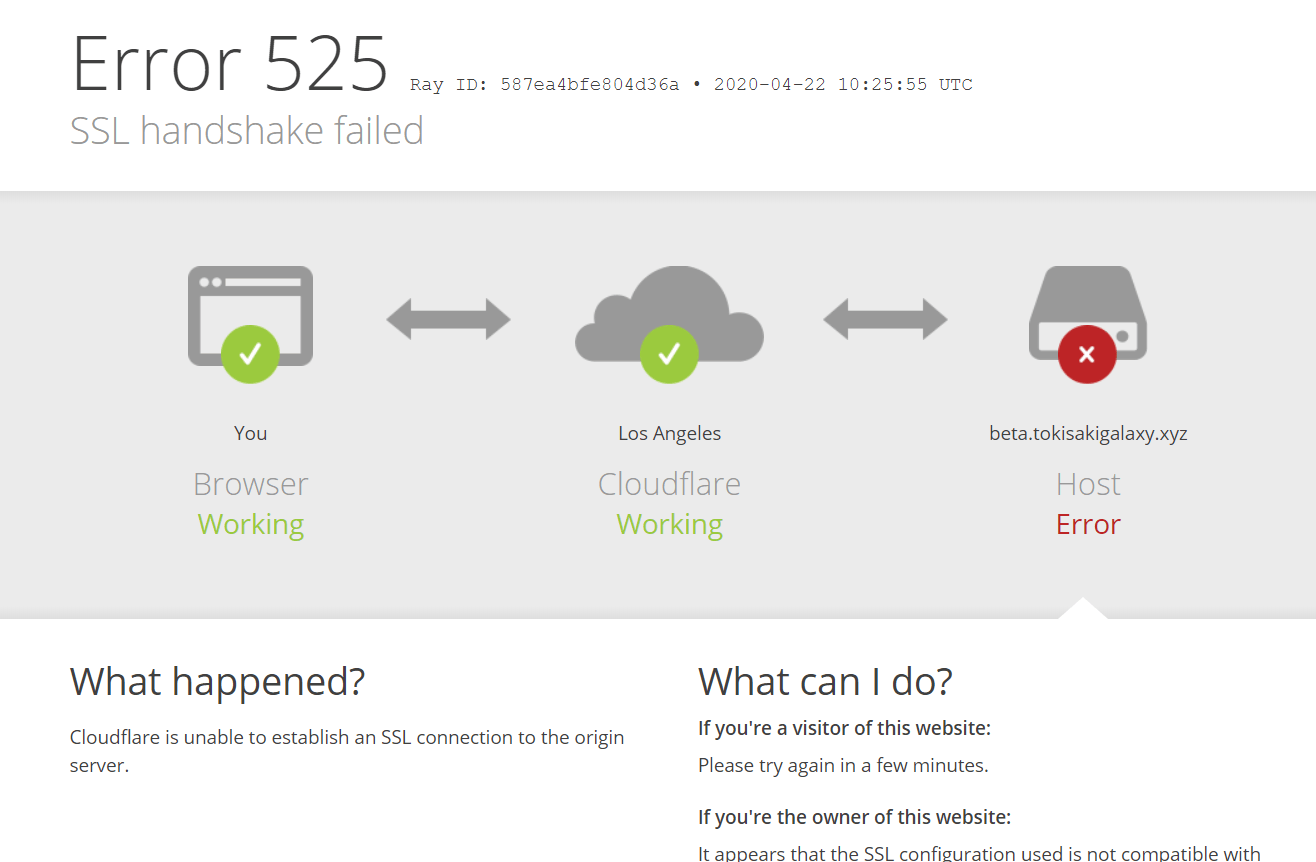
这个问题原因我也不太清楚,但是可以通过设置cloudflare里面SSL/TLS规则来消除

如上图,先设置成关闭,然后访问你的博客直到可以正常访问,再设置成完全。
第二部分
大概就是讲博客的自定义配置,懒得写了。
等以后有空或者有人看再写吧。
接入评论
Gitalk
附件
!update.bat
1 | |
!preview.bat
1 | |
第三部分
自带的节点已经足够好了!!!几乎可以不用自定义节点了
自定义节点可能还会减速!!!
Part 1
An Introduction to HEXO
Hexo is a fast, concise, and efficient blog framework. Hexo uses Markdown (or other rendering engines) to parse posts and generate static web pages with beautiful themes in just a few seconds.
I originally used Jekyll, but unfortunately, it supports fewer features and is slower to generate, so I switched to HEXO.
1. Installing HEXO
Everything is available on the HEXO Chinese documentation.
2. Create a New Repository
If you are uploading the entire HEXO folder!! You MUST set it to private!!
If you are using deploy, then it’s up to you whether to set it as private or not.
Go to Github and create a new repository, you can name it whatever you like, but remember to set it to private. This ensures that only you and the Vercel bot can see it.
As for why upload the entire HEXO folder, the reason is that if you switch to another computer, you can continue writing blogs, right?
3. Initialize HEXO
1 | |
Associate with Github
1 | |
3. Download a Theme and Set Up Submodule
Directly cloning the template and then updating later is very cumbersome, so use submodules.
Recommended template: hexo-theme-matery (of course, you can use others).
First, fork it to your own repository on the webpage, then execute git submodule add https://github.com/blinkfox/hexo-theme-matery/ themes\hexo-theme-matery in the root directory to clone it as a submodule into the themes\hexo-theme-matery directory.
Then try to push using GitHub Desktop or Git. If there are no issues, proceed.
Of course, some tutorials will talk about setting up deploy. Uploading the source directory and uploading the public directory have exactly the same effect, the only difference is a slight variation in deployment on Vercel. But I prefer this method. (After all, you can write blogs directly on GitHub, right?)
4. Local Preview
Open any CMD or PowerShell, navigate to the folder from the previous step, type hexo s, wait a moment until you see Hexo is running at http://localhost:4000, then open this URL in your browser.
After viewing, press Ctrl+C to close the local preview.
Oh, and the first time you do this, it will ask you to install dependencies, just follow the prompts.
5. Using zeit for Hosting
Why Use zeit for Hosting
Baidu indexing
Free
Vercel is the easiest way to deploy websites. Host your web projects with zero configuration, automatic SSL, and global CDN.
Similar products include netlify, which is actually pretty good too. I don’t use it because I can’t open its page without a VPN.
Actually, I originally used GitHub Pages, but I didn’t like the domain (xxx.github.io), and it couldn’t be crawled by Baidu, so I eventually gave up on it.
Of course, you could also use coding for domestic traffic splitting to achieve the goal of getting Baidu to crawl your site, but it’s too much trouble.
And coding’s service isn’t very stable. (2021 update for coding, I haven’t tried it, so I can’t comment).
Another option is gitee, which is excellent in many aspects, except it doesn’t support custom domains.
1. Register zeit
2. Import
On the homepage, click “Import Project”, then “Import Project From Git Repo”, select GitHub. Authorize, then choose the repository you created at the beginning to import.
Note: If you use my method, syncing the entire hexo folder to the cloud, you’ll see your type is HEXO; if you use deploy, it will show as other.
Finally, you can access a URL similar to xxxx.now.sh to visit your blog (much nicer than GitHub’s xxx.github.io, right?).
And if you are syncing the entire HEXO folder to GitHub, you’ll discover…
3. Get a Domain
Some might ask, is the now.sh domain from zeit not good enough? Why get your own domain? Of course, it’s fine, but the access speed is painfully slow! With your own domain, you can use Cloudflare for acceleration!
You can get a domain from anywhere. You can buy a domain from Tencent Cloud; you can get .xyz for as low as 1 yuan for the first year, and it comes with email hosting.
Of course, you can freeload. Go to freenom to register a free domain, then change the NS service provider to Cloudflare.
(But domains from freenom seem not to be able to register Tencent’s enterprise email).
4. Register cloudflare
As mentioned earlier, now.sh’s access speed in China is not (heartbreakingly) good. Using Cloudflare can significantly improve access speed.
Go to cloudflare to register an account, then follow the prompts step by step to change the NS records (name server records) to those provided by Cloudflare.
After this, all your DNS changes must be made on Cloudflare, otherwise they will be ineffective.
5. Add a Record Pointing to Vercel
Go to Vercel, find “view domains” in your project, and enter the domain you want to use (prefix + “.” + the domain you got earlier).
Then follow its instructions to add a CNAME record in Cloudflare.
Actually, I wanted to set a CNAME record, but if I set CNAME, some weird issues always pop up, so I had to set it as an A record.
No matter what, please make sure the proxy status is yellow (proxied).
No matter what, please make sure the proxy status is yellow (proxied).
No matter what, please make sure the proxy status is yellow (proxied).
6. Add a 404 Page
Create a now.json file in the root directory with the following content.
1 | |
Potential Pitfalls
1. Accessing the blog results in a 525 error, as shown below
I’m not entirely sure of the cause of this issue, but it can be resolved by adjusting the SSL/TLS rules in Cloudflare.
As shown above, first set it to off, then access your blog until it loads normally, then set it back to full.
Part 2
This section is mainly about customizing the blog configuration, which I’m too lazy to write.
Will write it later if I have time or if there’s interest.
Integrating Comments
Gitalk
Attachments
!update.bat
1 | |
!preview.bat
1 | |
Part 3
The default nodes are already good enough!!! You almost don’t need custom nodes.
Custom nodes might even slow things down!!!