China Mobile Broadband IPv6 and IPTV Configuration
登录光猫管理页面
移动光猫的管理地址一般在192.168.1.1,普通用户名与密码光猫盒子最下面有写(不过那个账户就是看个笑话)。
超级管理员账号:CMCCAdmin,密码aDm8H%MdA。
超级管理员比普通用户有更大权限,更多可设置内容。
(弱智移动超管账户密码都设成全国统一2333)
设置桥接
用超级管理员登录,点最上面绿色那里的网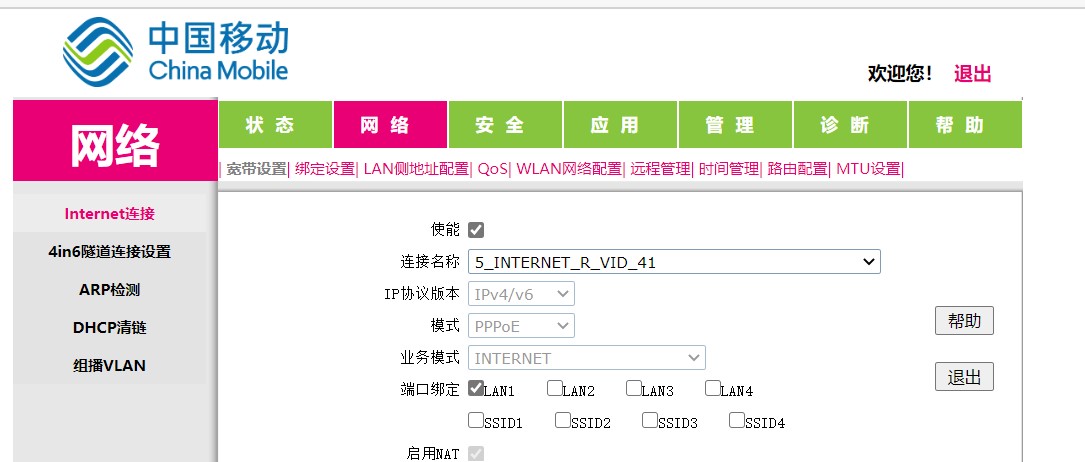
点连接名称,右边那个下拉菜单点新建
新建一个,端口选LAN3,改为桥模式。
然后在物理上把网线从LAN1拔下来,插到LAN3上。
PS:为什么我要用LAN3,不直接改LAN1,因为如果搞砸了还能改回去。
路由器设置
改为拨号,输入账号密码完事。
如果你不知道宽带的密码(像我一样,可以用开户的手机发短信CZKDMM到10086,会重置一个新随机密码给你
IPTV
原来移动的IPTV是用网线连在光猫上的,我想把iptv盒子换到房间里,懒得拉这么长的线,所以用无线连接。
登录光猫管理地址,用超管登录,还是设置桥接的那个界面,找到6_OTHER_B_VID_48那一栏,端口绑定应该只有LAN2被勾上了,把下面SSID1勾上,就可以用无线连接iptv了。
Logging into the Optical Modem Management Page
The management address for China Mobile’s optical modem is usually 192.168.1.1. The default username and password are written on the bottom of the modem box (though that account is essentially useless).
Super administrator account: CMCCAdmin, password aDm8H%MdA.
The super administrator has greater permissions and more configurable options than the regular user.
(Sillily enough, China Mobile set the super admin account and password to be the same nationwide, lol.)
Setting Up Bridge Mode
Log in using the super administrator account, click on the “Network” tab at the top in green.
Click on “Connection Name,” then select “New” from the dropdown menu on the right.
Create a new connection, select LAN3 as the port, and change it to Bridge mode.
Then physically unplug the network cable from LAN1 and plug it into LAN3.
PS: Why do I use LAN3 instead of directly modifying LAN1? Because if I mess up, I can still revert the changes.
Router Settings
Switch to PPPoE dial-up mode, enter the account and password, and you’re done.
If you don’t know the broadband password (like me), you can send a text message CZKDMM to 10086 using the registered mobile number, and a new random password will be reset for you.
IPTV
Originally, China Mobile’s IPTV was connected to the optical modem via an Ethernet cable. I wanted to move the IPTV box to another room without pulling such a long cable, so I used a wireless connection.
Log into the optical modem management address with the super administrator account. On the same page where you set up the bridge mode, find the row labeled 6_OTHER_B_VID_48. The port binding should only have LAN2 checked. Check SSID1 below, and you can now connect the IPTV wirelessly.